Description
Related to Create custom sidebar sections and Deprecate Spaces and separate Databases from Views
Problems
Cluttered Left Menu: As the number of Spaces increases, the left menu becomes cluttered, making it difficult for users to navigate and find the desired Space.
Grouping and Organizing Spaces: Users need a way to organize Spaces into folders or groups to manage them more effectively, especially as the number of Spaces grows.
Solution
We went with Folders approach. Default Space + Folders
Retrospective with :kostik:
In general 3 solutions are possible
| Just allow to add custom Sections | Default Space + Folders | Default Space + Nested Spaces |
Concept | In sidebar admin will be able to create Sections and put Spaces and Views inside Sections | In Default Space admin will be able to put Spaces into Folders | Admin can create Nested Spaces |
Hierarchy | 2 levels (Sections → Spaces) | Any levels levels (Folders in Default Space → Folders → … → Spaces) | 3 levels (or as many as we allow) |
Permissions | Permissions are per-space, more time to setup, but more flexible Section is not visible when a user has no access to all spaces. If at least one View exists in Section then Section is visible ✔️ save time on permissions development | Permissions are per-space, more time to setup, but more flexible (for non admins) Folder is not visible when a user has no access to all spaces. If at least one View exists in Folder then Folder is visible ➕ Allow to add Spaces in Folders (in Default Space only) ✔️ save time on permissions development | Permissions are inherited |
Views | ➕ We can allow to add views to sections ➕ No top level views (but we can add itt) | ✔️ | ✔️ |
Databases | ❌ Section can't have Databases | ✔️ Default Space has Databases ❌ Folder can't have Databases | ✔️ (however, every database will demand separate access, so it will take time to give it to users, especially new) |
| | | |
Folders in Default Space
It is possible to create Folders in Default Space and put Spaces into these Folders (any level)
It should be possible to add new Space into Folder in Default Space (Space should appear in this + menu)
Drag and drop
Folder visibility
Folder is not visible when a user has no access to all spaces. If at least one View exists in Folder then Folder is visible
Folders DO NOT AFFECT Space permissions
Folder deletion
When Admin deletes Folder, all nested Spaces go to top level. They are not deleted.
If there are nested Folders, Spaces go to one level up.
Workspace template
Folders with spaces inside should work
Public Space
Nothing should change here
Open problems
📦 Archive 0 (once again….)
Idea was born in Fibery concepts exploration
TLDR of the full solution:
Spaces are nested
By default there is one Top Space (and it is hidden from UI), so users can add Views, Smart Folders, and Databases into left Sidebar (Genius idea by :chris-gibbs: that make everything works in this solution)
Smart Sections are gone, since Smart Folder can play this role.
Databases are visible in left menu
Power to admin: organize left menu that looks the same for all users (well, permissions change it, but overall it is the same)
Power to user: add some Spaces and Entities to My, so focus on important things.
Maybe add Collapse All icon into this menu as well
Chris image is also correct
Default Space
See this feature → Default Space (without databases)
Nested Spaces
Admin (or Space Creator) can create Nested Spaces. So every Space has + New Space in + menu as well.
Favorites and Private are always on top.
Spaces visibility & access propagation
Access is always propagated from the parent Space to its children, grandchildren, and so on. If someone is granted Commenter access to Customer Success, they will always have at least Commenter access to Feedback, Intercom, Discourse, and Support.
Although the access can't be revoked on the lower levels, it can be upgraded. For example, the same user can be granted Editor access to Feedback (propagated to Intercom and Discourse) and Creator to Support. This is just a natural consequence of summing all the access sources for the user : Commenter + Editor = Editor.
A user can also receive access on lower levels without having access to the parent Space. For example, be an Editor in Support while having no access to Customer Success. In this case, Support Space appears in the sidebar as a standalone Space for this user.
🍿 Technical implementation is easy according to :shch: , so it is mostly UI problem
Space DnD
Admin can DnD Space to another Space.
❓ Should it change Space-level access and visibility.
For example, I have access to Slack space and have No Access to Feedback Space. Admin moves Slack → Feedback, so I lose access to Slack Space.
If admin moves Slack Space back to top level, then Space keeps explicitly set access, like If I added some users to Space with some settings, they will remain.
Space Deletion
When an admin deletes high level space, ask to delete low level spaces as well.
If a user selected to keep nested spaces, then they move on first level.
Folders
So far we will keep them for backward compatibility. Folders will contain Views as usual.
But maybe we should convert Folders to… Spaces? Indeed it is possible to have Spaces without Databases, so why keep Folders?
Folders are lightweight and easy to create, Space is more demanding (lcon, default database, etc). To make it work Space creation should be lightweight as well (just a name with some default icon). Maybe change this behavior a bit, like in Top Space we create proper spaces with a default database, but inside Space it is becoming lightweight?
Nested spaces visualization in various areas
will we need to display the nesteness in the databases lists in the views setup, etc?
❓Yes, but we should go through UI and see where it should be added. Michael Dubakov TBD
What a non-admin user can do?
Add Spaces and Entities (from Smart Sections) to My and enjoy simplified and predictable menu. For example, add only specific Team A from Teams Smart Section into My and have a very simple structure in My
Teams
- Team A
  - Backlog
  - Progress
Since a user can't re-order things, we don't have this problem anymore (it will be always predictable) → Make Spaces order in the left menu predictable (invitees)
Hidden for Me
Maybe we will keep it. Based on users feedback it is still good to hide some irrelevant spaces. Hidden for Me works on a user-level, so removing it will make things less customizable.
We may remove it in the future, but now it is a risky move.
This section will be removed.
❗️ Any user can add Spaces and Entities to My. So after update spaces that were Hidden from Me will become visible.
Public Space
Just show list of shared Spaces as we do now.
Import workspace / template
Nested Spaces should be supported.
If we decide to make nested spaces Pro, then we should decide what to do with templates with nested spaces.
Include Smart Sections into workspace template
How workspaces can look with nested spaces?
the.fibery.io nested spaces
Company
- Vacations
- Hiring
- Secret Santa

Finances
- Accounting
- Sales Invoices
- Administrative

Marketing
- Blog

CRM
- VC
- Partners
- Braintree
- Chargebee
- Email

Product
- Strategy
- Product management
- App Tracker
- Soft Dev
- Stats?

Customer Success
- Education

Feedback
- Intercom
- Discourse
- Slack Feedback
- Feedback App requests

Public
- Changelog
- User Guide
- Public roadmap
- Fibery process

Misc
- World
- Recent items
Implementation Path
Introduce Default Space
Remove Spaces section, all Spaces will be lifted one level up from a user perspective
Remove Smart Section concept. Move existing Smart Sections as Smart Folders to Top Space.
Add Nested Spaces
📦 Archive 1. Sections
TLDR
Power to admin: use Sections and Smart Sections to organize left menu that looks the same for all users (well, permissions change it, but overall it is the same)
Power to user: add some Sections, Spaces and Entities to My, so focus on important things.
TBD:
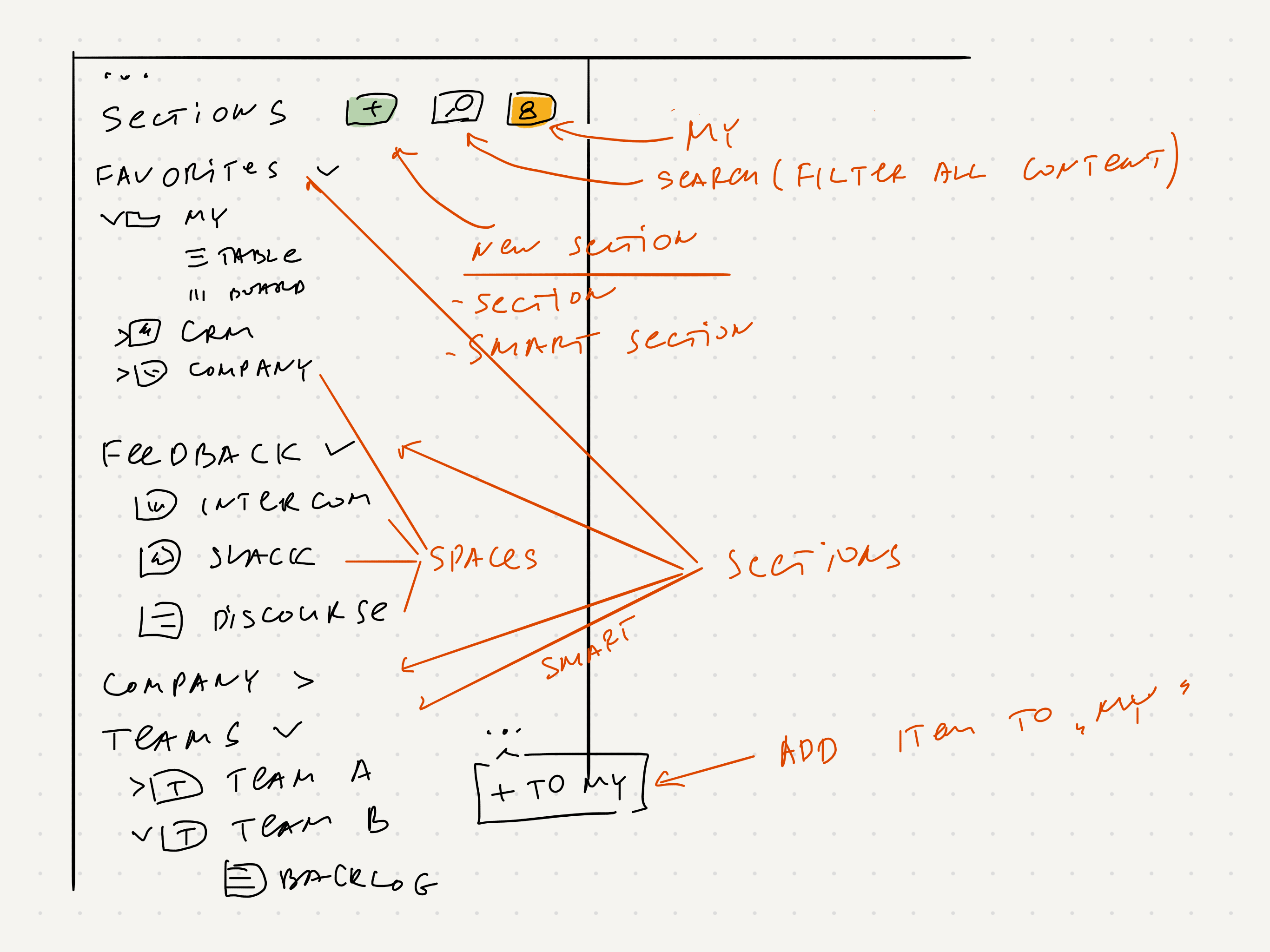
Original idea was to use Hide.
Maybe replace Hide concept with My concept and allow people to customize menu in My fully, including DnD. It somehow resembles Favorites, but it also conflicts with this idea, so we should choose between Favorites improvements or new My concept.
Hide vs. My
My is a whitelist, so in general it seems it is way easier for a person to add some important things into My than hiding many many things. For example, for a developer maybe 1 entity in a smart section and 2-3 spaces are enough.
In general it is easier to automatically add some things to My for a user (and the user is free to remove items from My later)
Check Separate "My" from "All" in the sidebar
For new users we my add some rules to add things into My: Sections, Spaces, Smart Sections and exact entity.
Another idea was to use Favorites instead of My, but it seems Favorites are not super popular and 60-70% of users do not use them at all. Here we could expand Favorites functionality so users can use it to organize data:
❓ How many users use Favorites from Paid accounts (logged in in Fibery at least 5 times last 90 days). We have ~6000 such users, and here are the stats
At least one item in Favorites: ~38%
At least 4+ items in Favorites: ~20%
At least 10 items in Favorites: ~9%
IF we have Favorite action date, then we can also check adding/removing frequency
Favorites count      Users count
0 	 3667
1 	 527
2 	 329
3 	 223
4 	 182
5 	 169
6 	 106
7 	 88
8 	 83
9 	 66
10 	 55
11 	 48
12 	 55
13 	 36
14 	 43
15 	 36
16 	 33
17 	 27
18 	 25
19 	 22
20 	 21
21 	 12
22 	 13
23 	 14
24 	 6
25 	 12
26 	 11
27 	 9
28 	 6
30+  78
We already have Sections in left menu now. Let's expand this idea and introduce proper Sections.
There will be 3 types of Sections:
Special Sections (can be also hidden by any user):
Favorites (maybe do not show this section if 0 items in favorites?)
🦄 Popular & Recent (new section, here we will show top 10-20 views/entities a user navigates to during the last 7-15 days and last 10 recent items, out of scope of this feature).
Threads (experimental feature so far)
Private (My Space is renamed to Private)
All Spaces (now it is called Spaces) (it will be a default Section now that an admin can rename and even delete when move all spaces to other Sections)
Hidden for me (we don't need it anymore)
Sections (custom and manual, created by admin, can contain Spaces only)
Smart Sections (we have them already, from Smart Folder)
What an admin can do?
Create several Sections and group spaces by these sections.
Create few Sections, few Smart Sections, reorder them as admin wants
Enforce left sidebar structure for all invited users (and even for current users via a special command). Add an action for admin: Enforce sidebar structure to all users that will set admin's left menu for all users. It can be in General Settings. (We don't need it anymore, since left menu will be the same for all users).
What a user can do?
Add Sections, Spaces and Entities (from Smart Sections) to My and enjoy simplified and predictable menu. For example, add only specific Team A from Teams Smart Section into My and have a very simple structure in My
Teams
- Team A
  - Backlog
  - Progress
Since a user can't re-order things, we don't have this problem anymore (it will be always predictable) → Make Spaces order in the left menu predictable (invitees)
Spaces section
By default one Section is here and it is called Spaces. Admin can rename it.
❗️ Admin can't delete Section if it has at least one space
Admin can create new Sections and move Spaces to these sections.
Space belongs to exactly one Section.
Smart section
Smart section is a Smart Folder but on a top level.
By default no Smart Sections created.
Create Sections
Only Admin can create Sections and Smart Sections.
There will be ➕ New Section menu above (or below?) all sections (only admin sees it), on click two options will be shown: Section, Smart Section
Add "+ New Smart Section" for Admins in sidebar
An admin clicks New Section → Section, and a new Section is added on the top (or on the bottom?) in left menu. Cursor is inside Section name so Admin types a name of the section and pushes Enter.
Empty Section has a placeholder inside visible for admin (Create or drag and drop some Spaces here)
There are two ways to put Spaces into Sections:
Every space has Add to Section action in … menu and a list of sections appears when this action is selected.
Admin can Drag and Drop Space to Section. Space can be only in one Section (All Spaces is an exception).
Rename Sections
There is a … → Rename action for a Section. Only admin can do it.
Delete Sections
Every Section (except Special Sections) has … → Delete action. Only Admin can do it.
Section with Spaces can't be deleted (so Delete action is there, but it is disabled and has a tooltip: "Move Spaces to other Sections to delete this Section.").
Only Admin can re-order sections
Only Admin can reorder sections (all of them, so it is possible to put Favorites to the bottom, for example, but for all users) via two mechanisms:
(Notion has it, but we will get rid of Move section menu)
Only Admin can re-order Spaces inside Sections.
Maybe we can move Favorites on top thus making it a special link, not a section?
❌ Hidden for Me
This section will be removed.
❗️ Any user can add Sections and Spaces and Entities to My. So after update spaces that were Hidden from Me will become visible.
My / All (filter)
There is My / All button that filters out Sections, Spaces and even Entities in Smart Sections, so a user can enjoy a simplified sidebar.
My switcher should be VERY visible, so users will notice that is ON (otherwise we will have a lot of questions "Where all the spaces gone?")
see Separate "My" from "All" in the sidebar
For example, a user can add just CRM space to My and Team A to My, in this case My menu will look quite simple. Parent section is always visible in this case.
It is NOT possible to hide anything now. My filter serves this purpose and it is accessible via single click.
All | My |
Favorites Private Feedback (section) Space: Intercom Space: Discourse Space: Slack
Sales (section) Space: CRM Space: Partners CRM
Departments (Smart Section) Entity: Department X Doc: Dashboard View: Backlog View: Work Tracking Entity: Team A Entity: Team B
| Favorites Private Sales (section) Departments (Smart Section) |
There are two actions: Add to My, Remove from My. Any user can do it.
Drag and drop is now allowed anywhere, including My section. Theoretically we can allow it, but it will make menu look very differently after My button click. Not sure.
After upgrade we will RESET order of Spaces. Users may be pissed. But My section will be less cluttered and maybe it will be OK.
My filter state is cross-device and last state is remembered.
Automations
We can use heuristics to figure out what things can be added to My for a user by default (we should have some migration script to execute these rules on existing data after the release).
Explore Separate "My" from "All" in the sidebar for more ideas about suggestions.
Any user can Hide/Show Sections and Spaces
Any user can hide any section. There will be … menu with Hide option.
There is a special action Show Hidden Sections (and it can be near New Section action). When it is clicked, all hidden sections become visible (in the same positions as set by Admin) with light text and special icon. A user can click … near Section (or Space) and select Show option.
Collapse/Expand sections
Any user can collapse/expand sections.
State is remembered per user (cross-device, if possible)
Find sections & content
Sections top menu has quickly filter for sections/spaces/folders/views/entities → Quick Filter Items in Sidebar by Name
Visibility
❓ Maybe some UI solution is good enough? Like if I am not an admin, and see nothing inside section, hide section via CSS?
Create Space
Create Space action is available in any Section.
Public workspace
❓ Don't show sections and smart sections, just a list of spaces
Import workspace / template
Import Sections and Smart Sections.
Include Smart Sections into workspace template
📦 Archive 2: More complex idea
Admin can create custom Sections and add several things into a Section:
Thus it will be possible to flexibly organize left menu and hide many Spaces from users (for example, All Spaces will be hidden and some Spaces will be revealed via custom Sections).
View and Entity still belong to some Space, Section is just a new way to organize them together in left menu. In a similar way Smart Section shows entities from some Space.
Thus we can add actions for Entity/View like "Show in Section … >"
However, it will make access harder to understand, since Section is NOT a permission container. It is OK for Smart Section, but not sure it will be OK here.
Some examples
Feedback (section)
Sales (section)
Department X (section)
Doc: Dashboard
View: Backlog
View: Work Tracking
Entity: Team A
Entity: Team B