Guide
This page explains the mental model behind Fibery's data structure. Once it clicks, most of the product starts to make sense. If you want to start building right away, head to Getting started tutorial (deep and long) — but this page will make that easier.
https://youtu.be/S2ybuyCLpSo
The core idea: organize by process, not by tool
Most work tools are built around a fixed concept. Jira is built around issues. Trello is built around cards. That works well — until your work doesn't fit their concept.
Fibery takes a different approach. Instead of giving you one data model, it gives you the pieces to build your own. The central design principle is that work is organized by process, not by tool type. A hiring process looks nothing like a product development process, and they shouldn't have to share the same structure. So they don't.
The hierarchy
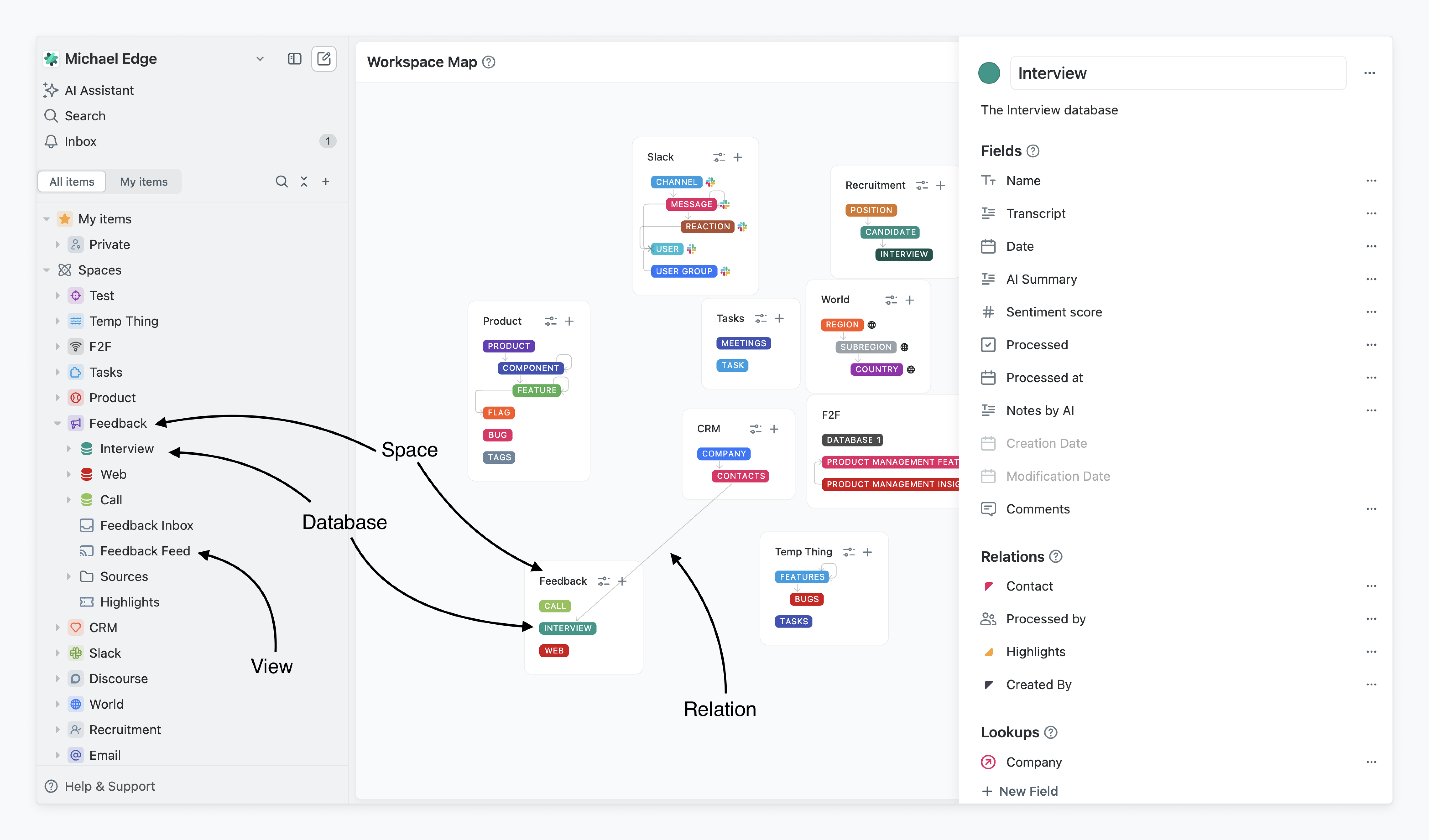
Fibery organizes data in layers. Here's what each layer is for.
Your Workspace is your company's Fibery account — the container for everything.
Spaces are the first layer of real organization. A Space maps to a process or department: Hiring, Product Development, CRM, Vacation Tracking. It holds everything that process needs — Databases, Views, Automations, Documents — in one place. If your team owns a process, they probably own a Space.
Databases live inside Spaces. A Database is a type of data you want to track: Candidates, Features, Projects, Interviews. Each Database holds records called Entities, which are the individual items: a specific Candidate, a specific Feature, a specific Project.
Relations connect Databases to each other. A Contact might have many Interviews. A Feature might have many Tasks. Relations are what turn a collection of separate Databases into a connected workspace, where pulling on one thing shows you everything related to it.
Fields define what an Entity looks like. Every Entity in a Database shares the same Fields: Name, Status, Priority, Assignee, and whatever custom ones you add. Fields hold the actual data — text, numbers, dates, files, or connections to other Databases..
Views are how you look at data. The same Database can have a Board for tracking status, a Table for bulk editing, a Timeline for planning. Different people on a team often need different Views of the same data.
Automations sit above all of this — rules that act on your data when conditions are met. When a Candidate's status changes, send a Slack message. When all Tasks on a Feature are done, mark the Feature complete. Automations are what turn a structured workspace into one that does work for you.
The trade-off
This flexibility is genuinely powerful. It also has a real cost.
Most tools make decisions for you. That's limiting, but it's also fast — you can be productive in Linear on day one without thinking about data models. Fibery asks you to make those decisions yourself. What Databases does your process need? How should they relate? What Fields matter? For whoever sets Fibery up, that's meaningful design work.
If you've never thought about structuring data before, expect a learning curve. The upside is that once the structure fits your process, it stays that way — you're not bending your work to fit the tool. And as your process evolves, Fibery can evolve with it, instead of forcing a migration to a new tool.
Next
How to build your own process? There are two ways right now:
Creating/configuring Spaces and Databases manually.
Installing pre-defined Spaces from Templates, modifying them and connecting them via Relations