Guide
Overview
Fibery's integration with Productboard allows for the seamless import of product hierarchy, user scores, and companies. This helps product managers improve feedback gathering and keep it closer to product development.
The Productboard integration template offers new views, additional fields, and formulas to replicate Productboard functionality in Fibery.
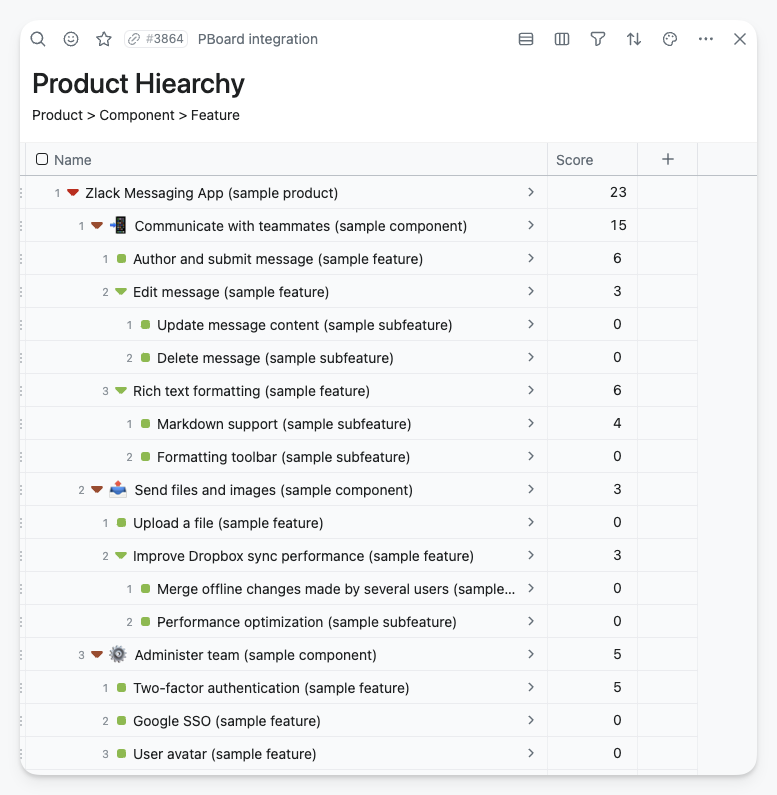
Import Product Hierarchy
You can import or sync Productboard's product hierarchy (product > component > feature) with customer feedback scores.
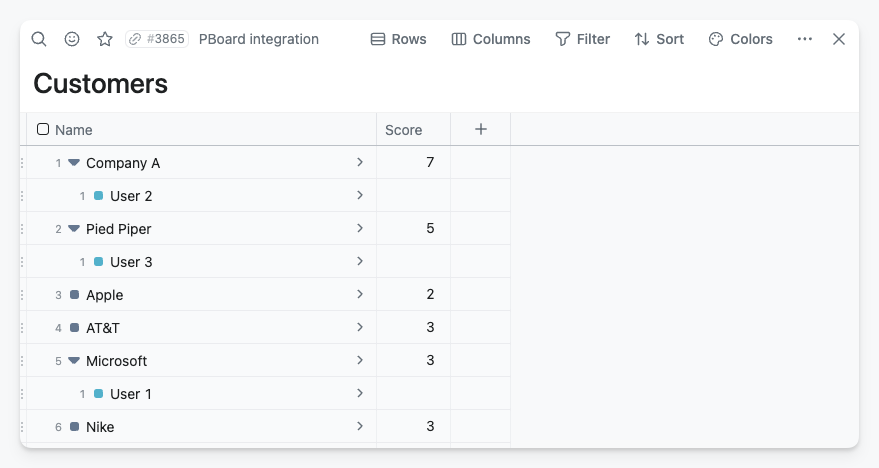
Import Customer Database
You can import customer information and display the user impact score.
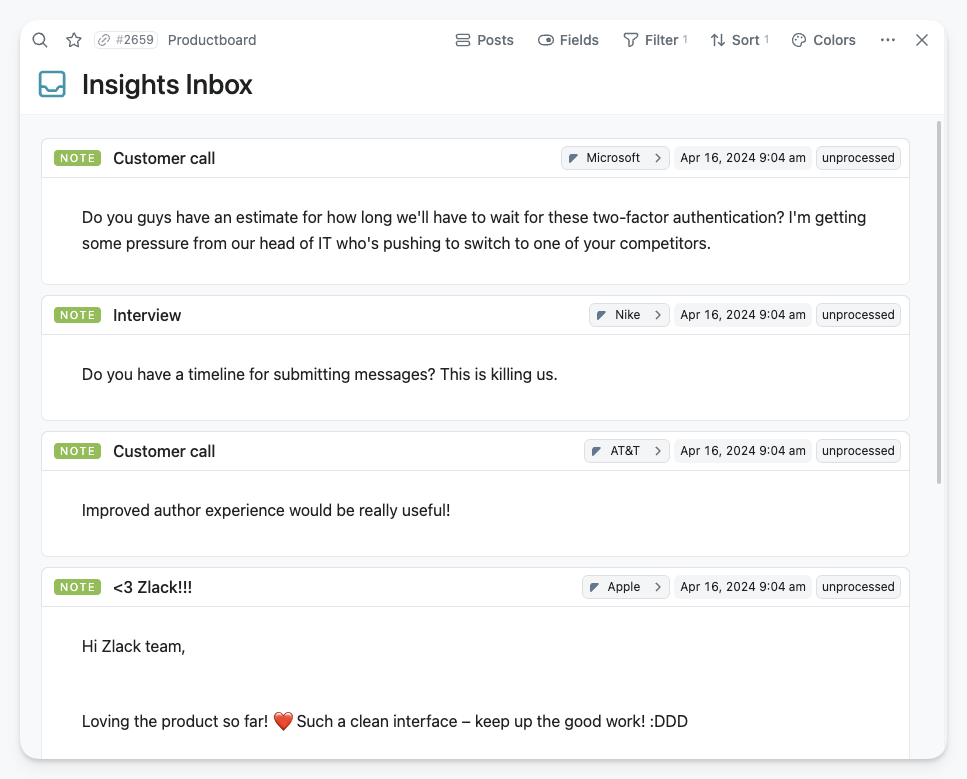
Import Insights
You have the option to import all your collected insights.
Setup
Follow the instructions below to set up the integration with Productboard.
Create a Space or go to an existing one.
Navigate to Space settings and click Integrate button.
Select Productboard.
Authentication of your Productboard account can be done through OAuth (recommended), but you may prefer to use a personal API auth token.
Customize the Integration settings.
Databases
Product, Component, Feature: Product hierarchy databases
Note: All the customer feedback.
Relevance: Importance level of the feature and product hierarchy connection.
Company, User: Customer databases.
Release Group, Release: Product release management information.
Objective: Strategy information.
Created From
All feedback notes are created on or after the selected date. The default setting is one month prior to today.
Set up Fields and Databases.
The fields provided by Productboard can be mapped to fields in the Fibery database.
Press the Sync now button and wait until the operation is complete.
Views
Using the Productboard Integration template will create useful views that are familiar with the Productboard setup.
Insight Inbox
Display all unprocessed notes, sorted in descending order by their creation date, ensuring the most recent item appears first.
All Insights
It functions like the Insights Inbox, but without filtering only the unprocessed items, thus displaying all Feedback Notes in a single view.
My Insights
When Productboard users are also Fibery users, the systems connect them automatically, allowing individuals to view the Notes assigned to them.
Strategic Roadmap
All objectives with a start and end date are displayed on a timeline for a clear visual understanding of parallel initiatives.
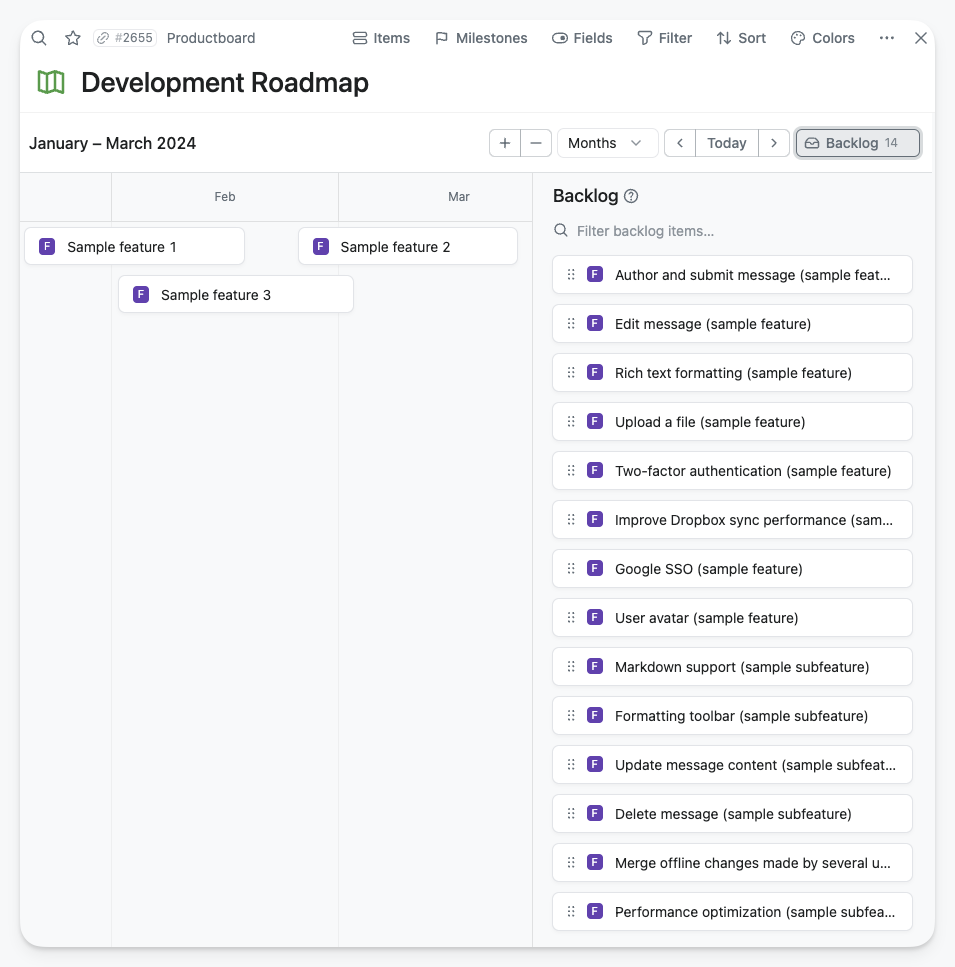
Development Roadmap
This timeline showcases all the features. Those without a specified date range are in the backlog and awaiting prioritization.
Product Hierarchy
This product hierarchy organizes a company's offerings in a structured manner, categorizing them by Product, Component, Feature, and displaying with their priority scores calculated by feedback notes.
Customers
The customer view displays all contacts, grouped by company, with priority scores determined by feedback notes.
New fields and formula
If you use the Productboard Integration template, it will create new fields and formulas to help you use it more effectively.
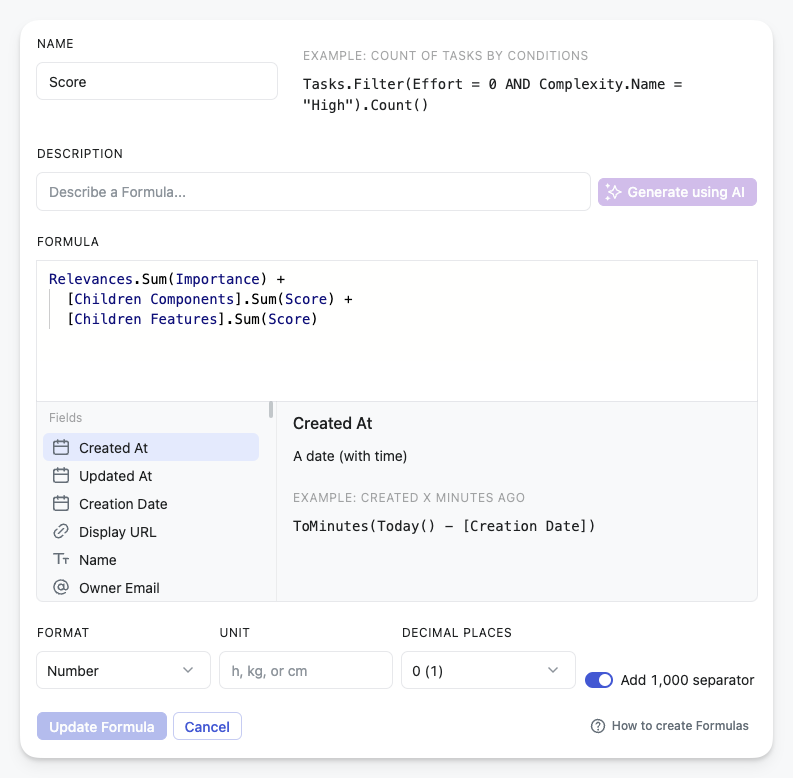
Score
The score is calculated by summing the Insights noted and assigning weights based on their importance. It is calculated at every level of the product hierarchy: feature, Component, and Product, including the sum of all items within each level of the hierarchy.
The score calculation has three parts:
Relevances.Sum(Importance) + [Children Components].Sum(Score) + [Children Features].Sum(Score)
Relevances.Sum(Importance): all the weighted scores get the Component itself, plus
[Children Components].Sum(Score): all the weighted scores of the child components, plus
[Children Features].Sum(Score): all the weighted scores from the connected features
The Score field is added to Products, Components, Features, Companies, and Users (Customers) to assist in calculating priorities from various perspectives.
Building Company and User relations
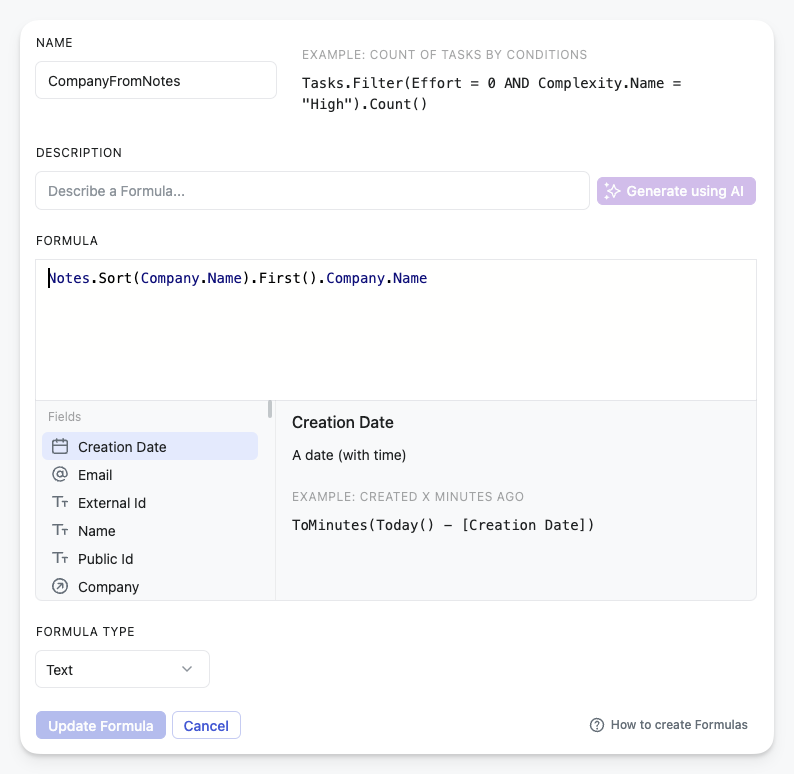
Unfortunately, the public API does not have direct access to the Customer database. However, if a customer has an entry in the Notes database, we can link them back to the Company using a certain method. For the there is a CompanyFromNotes technical field in the User database.
This information is used to automatically link Users with Companies, creating the Customer view.
Known Issues and Limitations
Due to the lack of API coverage and support, several items cannot be migrated or removed from Productboard.
Notes feedback. The notes and feedback content are accessible, but it's unclear which element of the product hierarchy they refer to. Those who need to work with this information can find it in the Note database's Raw Content field.
Companies. No information is available about the relationship between the company and the users. However, if there is a feedback note from a user, we can infer which company the user works for. Please note that we cannot connect users to the company if they do not have any feedback.
Members. The information on Productboard members is not directly available through that API, but members who follow a note in Productboard will show up in the Raw followers field for that note. No information can be retrieved if a member does not follow any notes. If this is a problem, consider solving it by having at least one Productboard note with all members as followers.
We do not support migrating/sync the following information from Productboard:
Feature: attachments, comments, connected objectives, creator of the feature, dependencies, effort, drivers, followers, health status creator/owner, members and teams, portal card info, progress and setting type, scores, segments, and their importance, status settings, tags, tasks.
Components: attachments, comments, followers, members & teams, portal card info, tags.
Product: attachments, comments, drivers & scores, followers, members & teams, release groups, tasks, tags.
Company: comments, custom company fields, followers.
Note: attachment, sentiment, summary.
User: comments, company, description, follower, tags, user segment.
Release: comments, followers, progress, progress setting type.
Objective: comments, followers, progress, progress setting type, team, theme.